Skip to content
Supply Chain · Purchasing

From “we need it” to “the supplier is paid” — and the books agree.

Requisitions, RFQs, purchase orders, receiving, vendor bills and payments in one flow, with a three-way match on every line and landed cost on every receipt.

Read the user guide
ordered · received · billed
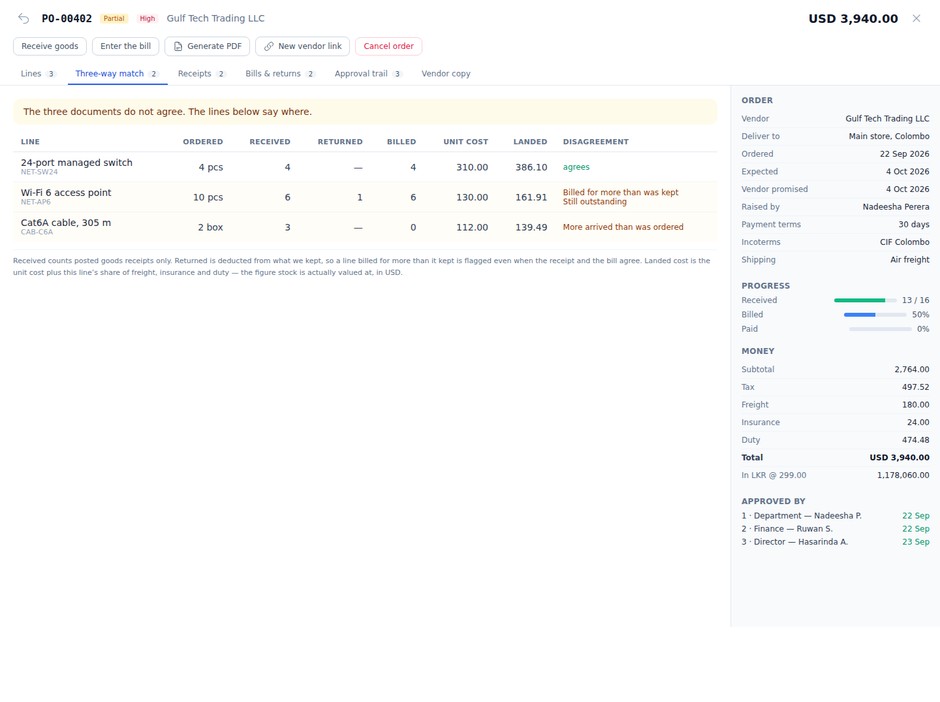
3-way match
freight, duty, insurance
Landed cost
accept, date, invoice
Vendor link

How it fits

Purchasing buys. Inventory and Finance keep the score.

Stock moves only through Inventory and journals only through Finance — Purchasing never writes either directly, so the shelf and the ledger always agree.

InventoryStock in at landed cost; returns out
Projects, HR, Garage…Raise requisitions where the need is
ApprovalsOrdered steps by amount and role
PurchasingVendors · requisitions · RFQs · orders · receiving · returns · bills · payments · reportsRequisition → source → order → receive → bill → pay
FinanceBills, debit notes and payments posted
DriveBill scans, vendor papers, PO PDFs
Vendor linkSuppliers answer the order themselves

What it does

Every step from need to payment.

Go to market, commit, receive, match and pay — with the numbers that matter to a buyer, a storekeeper and an accountant on the same record.

01Three-way match

Ordered, received, billed — line by line

Each line compares what you ordered, kept (net of returns) and were billed, and says in plain words where they disagree.

02RFQs

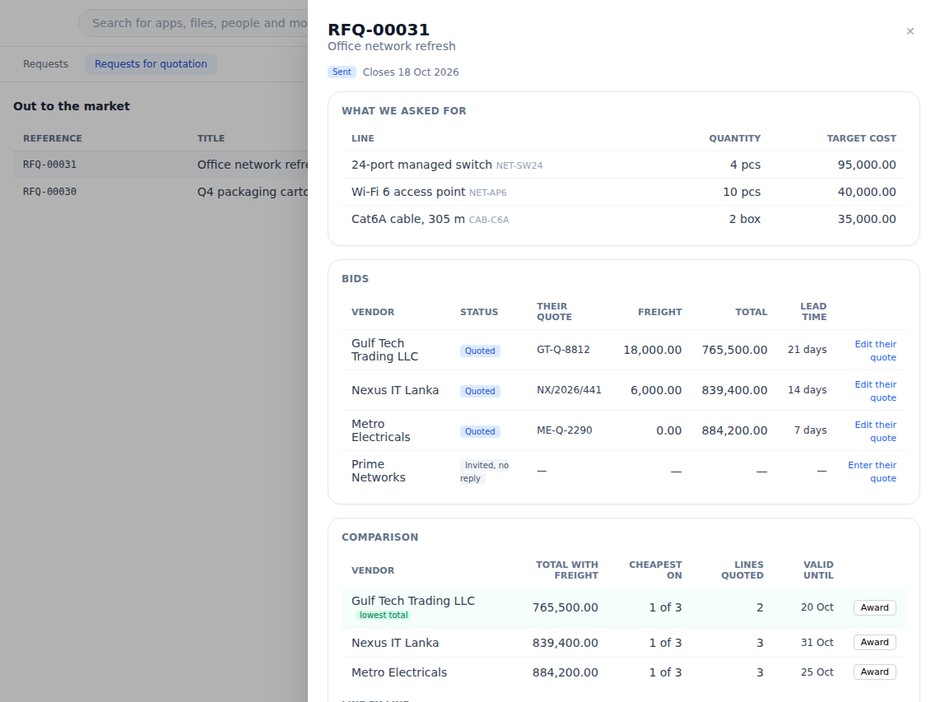
Compare bids on landed cost

Bids are compared with freight included; awarding needs a reason and creates the purchase order.

03Receiving

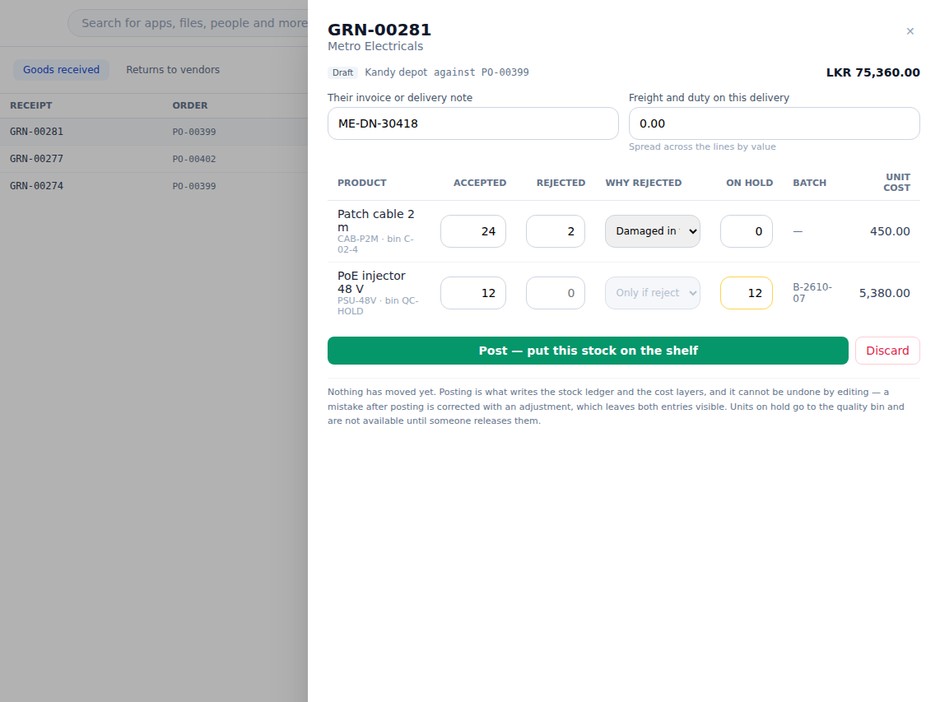
Receive, inspect, hold

Accepted, rejected with a reason, or held — with bins, batches, expiry and serials.

04Payments

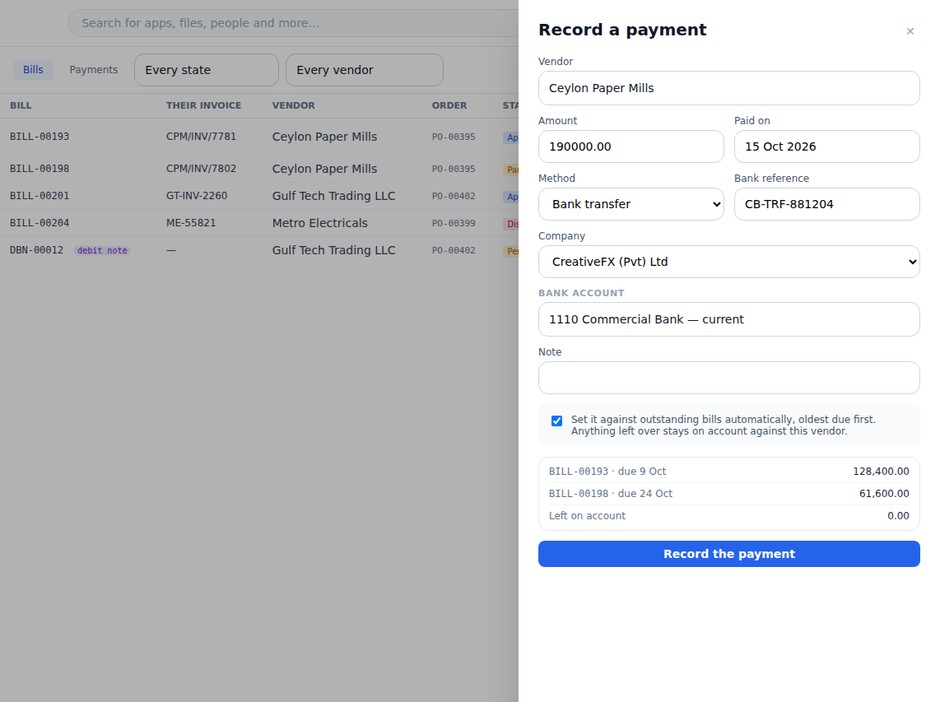
Pay and allocate

Allocate by hand or oldest first; payables ageing always exact.

05Owed

Know what you owe

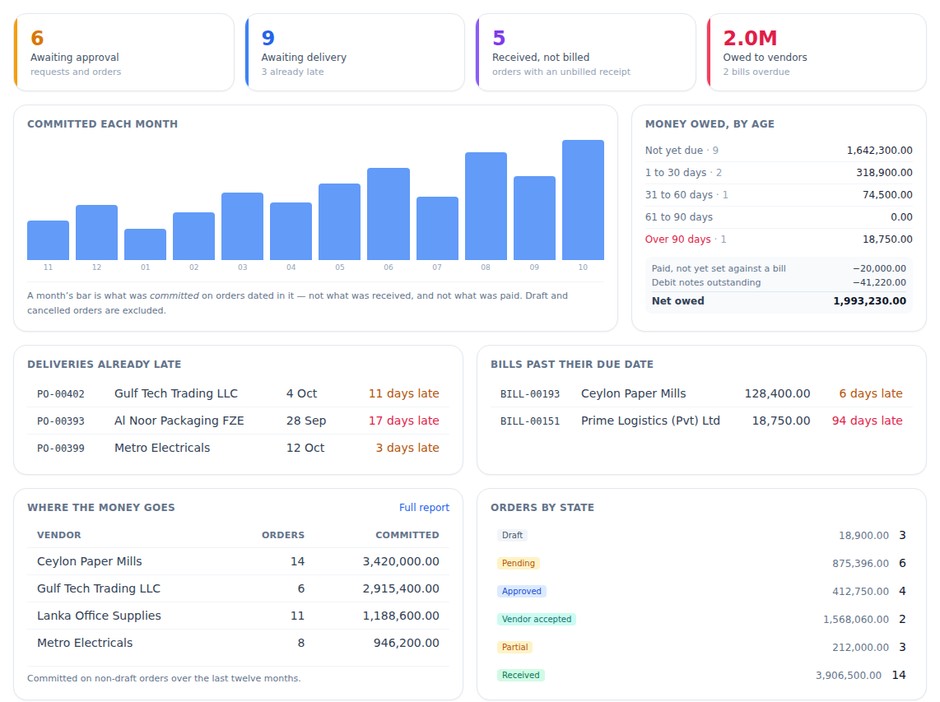
Ageing, received-not-billed and overdue bills on one dashboard.

Orders and bills

Controls that keep the books right.

Vendor bills go through ordered approval levels — buyer, department, budget, finance, director — and reach the ledger only when approved.

Order
DraftApprovedVendor acceptedPartialReceived
Bill
Bill draftPendingApproved · postedPartialPaid
Not by the creatorOrders, requisitions and returns are approved by someone other than the person who raised them.
Landed costFreight, insurance and duty are spread by value into the unit cost stock is valued at.
No over-billingA bill for more than was received is refused unless the company allows it.
Exact moneyAmounts are kept in exact decimals, and a payment and its bills share one currency.

Around the order

Vendors, requests, returns — all connected.

Every document links to the one before it, so you can walk from a payment back to the request that started it.

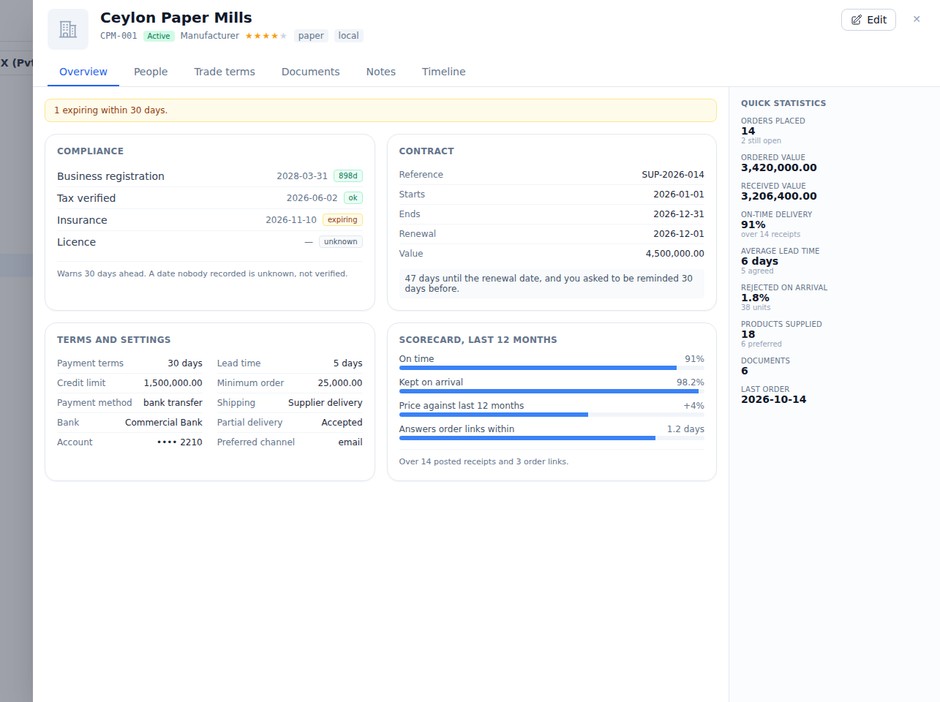
Vendor masterOne vendor list for the group, with terms, credit, compliance dates, documents and a scorecard.
RequisitionsAnyone asks; approved requests become one draft order per preferred vendor, or an RFQ.
ReturnsSend back rejected or held stock, ship it, and raise a debit note or expect a replacement.
Vendor linkA private page per order: the supplier accepts, proposes a date and uploads the invoice.
ReportsSpend by vendor, product or category, price trends, vendor performance and duplicate orders.

Orders and stock

  • Orders in the vendor’s currency, with incoterms, shipping and terms
  • Board and table views of orders, with late deliveries in red
  • Receipts post stock layers at landed cost and update the product cost
  • Every document numbered per company — orders, goods receipts and bills

Where it runs

At the desk, in the store, on the phone.

Purchasing runs on the web today. The roadmap adds vendor e-mail, a vendor portal, payment runs and budgets in six phases.

AvailableWebapp.worksuite.lk/purchaseThe full flow: dashboard, requests and RFQs, orders, receiving, bills, payments, returns, vendors and reports.
Partly availableDesktopWorkSuite DesktopOrders, receipts and requests inside Inventory today; a full Purchasing app with scanner receiving is next.
Partly availableMobileWorkSuite MobileReceive plain-quantity lines on the phone today; approvals, requisitions and scan receiving are next.

Coming next · roadmap

  1. Phase 0CorrectnessLedger fixes, PO submit step and approval chain, settings page
  2. Phase 1Money rightExchange rates, landed-cost vouchers, vendor price prefill
  3. Phase 2Talk to vendorsPO and RFQ e-mail, vendor portal accounts, QC queue
  4. Phase 3Every clientMobile approvals, desktop app with scanner receiving
  5. Phase 4ScalePayment runs and bank files, split award, imports
  6. Phase 5InsightBudgets, agreements, AI bill reading, scorecard

Features

Everything procure-to-pay needs.

01

Vendors

  • Type, status, priority, currency
  • Terms, credit and masked bank details
  • Contacts, addresses, documents
  • Compliance dates with expiry
  • Product mappings and price lists
  • Duplicate check and insight
02

Requisitions

  • Warehouse, needed-by and reason
  • Preferred vendor per line
  • Approved by someone else
  • One draft order per vendor
  • Or send to an RFQ
  • Generated from replenishment
03

RFQs and bids

  • Lines with a target cost
  • Vendors invited
  • Cost, lead time, freight, validity
  • Comparison by landed total
  • Cheapest per line
  • Award with a reason → order
04

Purchase orders

  • Vendor, warehouse, ship-to, dates
  • Incoterms, shipping and terms
  • Discount and tax per line
  • Freight, insurance and duty
  • PDF and vendor link
  • Cancel before any receipt
05

Receiving

  • Draft from what is outstanding
  • Accepted, rejected, on hold
  • Bins, batches, expiry, serials
  • Receipt freight into cost
  • Row-locked posting
  • Phone receiving for plain lines
06

Returns

  • Against a posted receipt
  • Pre-filled from rejected and held
  • Approved by someone else
  • Ship with carrier and tracking
  • Debit note or replacement
  • Settled when credited
07

Vendor bills

  • From a PO or free
  • Lines from received-not-billed
  • Match per line
  • Approval steps by amount
  • Expense routing per line
  • Disputes and debit notes
08

Payments

  • Method, bank account, reference
  • Cheques and payment files
  • Allocate by hand or oldest first
  • Un-allocate with reversal
  • Payables ageing
  • Posted to the ledger
09

Dashboard and reports

  • Awaiting approval and delivery
  • Received, not billed
  • Committed each month
  • Spend by vendor and category
  • 12-month price trend
  • Vendor on-time and rejects

Who uses it

Quick for the buyer. Exact for finance.

BuyerRuns RFQs, raises and chases orders, and keeps the vendor list.
StorekeeperReceives, inspects, holds for quality and ships returns.
AP clerkEnters and matches bills, and raises disputes.
ApproverDecides approval steps — department, budget, finance, director.

Works on the same records

All 43 apps